How to Use AI Research Assistant: A Complete Beginner’s Guide
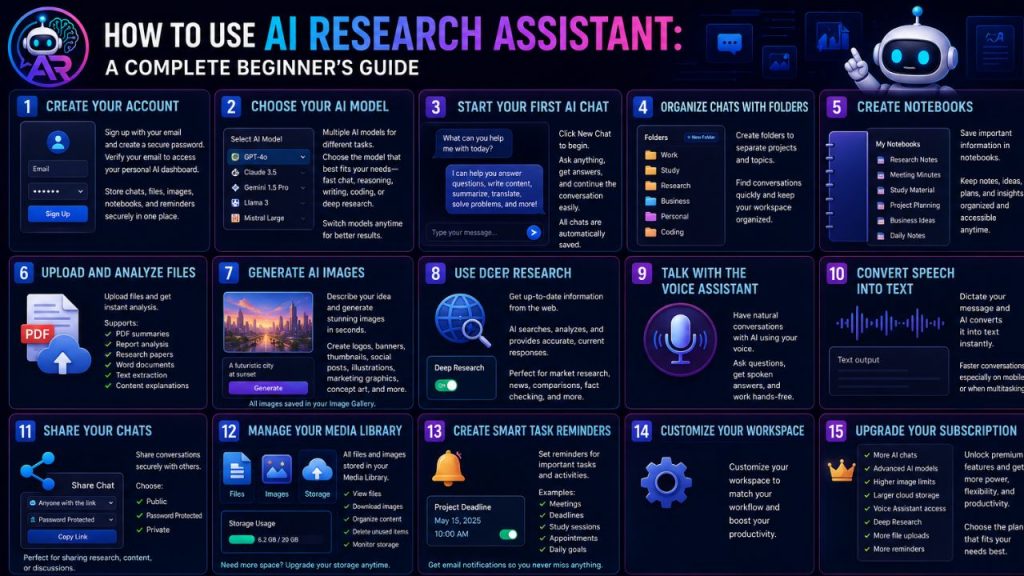
Getting started with AI Research Assistant is simple. Whether you want to chat with AI, perform deep research, generate images, organize projects, or manage daily tasks, the platform is designed to be easy for everyone.
This beginner’s guide will walk you through the essential features and help you make the most of your AI workspace.
Create Your Account
The first step is creating your AI Research Assistant account.
Simply sign up using your email address and create a secure password. After verifying your email, you’ll gain access to your personal AI dashboard.
Your account allows you to securely store chats, uploaded files, generated images, notebooks, and reminders in one place.
Choose Your AI Model
AI Research Assistant offers multiple AI models, each optimized for different tasks.
Depending on your subscription, you can select the model that best fits your needs, whether it’s fast conversations, advanced reasoning, creative writing, coding assistance, or deep research.
Switching between models is quick and allows you to get the best results for every task.
Start Your First AI Chat
Click New Chat to begin a conversation.
You can ask questions, write articles, generate ideas, summarize documents, translate languages, solve coding problems, or simply have a natural conversation with AI.
Every conversation is automatically saved, making it easy to continue where you left off.
Organize Chats with Folders
As your conversations grow, organization becomes important.
Create folders to separate different projects such as:
- Work
- Study
- Research
- Business
- Personal
- Coding
Folders help you quickly find previous conversations without searching through a long chat history.
Create Notebooks
Notebooks let you save important information separately from your chat history.
Use notebooks for:
- Research notes
- Meeting minutes
- Study material
- Project planning
- Business ideas
- Daily notes
Everything remains organized and accessible whenever you need it.
Upload and Analyze Files
Need help understanding a document?
Simply upload your file, and AI Research Assistant can analyze it within seconds.
Supported tasks include:
- PDF summaries
- Report analysis
- Research papers
- Word documents
- Text extraction
- Content explanations
This feature saves valuable time when working with lengthy documents.
Generate AI Images
Creating professional images is as easy as writing a sentence.
Describe what you want, and AI Research Assistant will generate original images based on your prompt.
You can create:
- Logos
- Banners
- Thumbnails
- Social media posts
- Illustrations
- Marketing graphics
- Concept art
Every generated image is automatically saved in your Image Gallery.
Use Deep Research
When you need current information, enable Deep Research.
Instead of relying only on existing AI knowledge, the platform searches the web to gather fresh and relevant information before generating a response.
This feature is especially useful for:
- Market research
- Technology updates
- Product comparisons
- News summaries
- Academic research
- Fact checking
Talk with the Voice Assistant
Prefer speaking instead of typing?
The built-in Voice Assistant lets you have natural conversations with AI in real time.
Ask questions, receive spoken answers, brainstorm ideas, or work hands-free while completing other tasks.
Convert Speech into Text
Speech-to-Text allows you to dictate messages instead of typing them.
This makes conversations faster, especially on mobile devices or during busy work sessions.
Share Your Chats
Need to collaborate with someone?
AI Research Assistant allows you to share conversations using secure links.
You can choose whether the chat should be:
- Public
- Password Protected
- Private
This makes it easy to share research, discussions, or AI-generated content with colleagues, classmates, or clients.
Manage Your Media Library
All uploaded files and AI-generated images are stored inside your personal Media Library.
From there, you can:
- View files
- Download images
- Organize content
- Delete unused items
- Monitor storage usage
If you need more space, additional storage packages are available.
Create Smart Task Reminders
Stay organized by creating reminders for important activities.
Examples include:
- Meetings
- Project deadlines
- Study sessions
- Business appointments
- Daily goals
- Personal events
AI Research Assistant sends email notifications to help ensure you never miss an important task.
Customize Your Workspace
Make the platform work the way you prefer.
You can organize chats, manage folders, switch AI models, review previous conversations, and personalize your workflow for maximum productivity.
Upgrade Your Subscription
As your needs grow, you can upgrade to a premium subscription.
Premium plans unlock additional benefits such as:
- More AI chats
- Advanced AI models
- Higher image generation limits
- Larger cloud storage
- Voice Assistant access
- Deep Research
- Increased file uploads
- Extended task reminder limits
Choose the plan that best matches your personal or professional requirements.
Tips for New Users
To get the best experience with AI Research Assistant:
- Use clear and specific prompts.
- Organize chats into folders from the beginning.
- Save important information in notebooks.
- Use Deep Research for up-to-date information.
- Upload documents instead of copying large amounts of text.
- Take advantage of AI image generation for creative projects.
- Set reminders for important deadlines.
- Regularly organize your Media Library to keep your workspace clean.
Final Thoughts
AI Research Assistant is more than just an AI chatbot—it’s a complete productivity platform designed to help you research, create, organize, and accomplish more in less time.
Whether you’re a student preparing for exams, a developer writing code, a writer creating content, or a business professional managing projects, AI Research Assistant provides the tools you need in one powerful and easy-to-use workspace.
Start exploring its features today and discover how artificial intelligence can simplify your daily work, boost creativity, and improve productivity.