AI Research Assistant

How AI Research Assistant Helps Students, Developers, Writers, and Businesses
July 6, 2026 admin

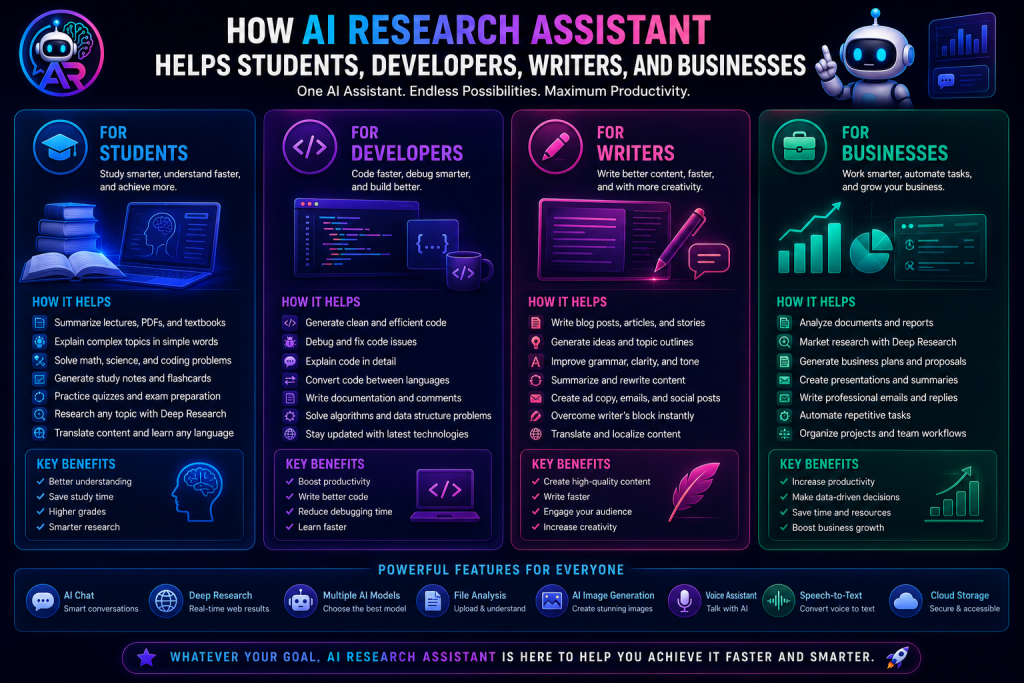
Artificial intelligence is changing the way people work, learn, and solve problems. Instead of spending hours searching for information or switching between multiple applications, users can now rely on one intelligent platform to complete their daily tasks more efficiently.

AI Research Assistant is designed to support people from different professions by providing AI-powered tools for research, writing, coding, creativity, organization, and productivity. Whether you’re a student preparing for exams or a business owner managing projects, AI Research Assistant helps you work smarter every day.

How Students Benefit from AI Research Assistant


Students often spend a significant amount of time researching topics, writing assignments, and preparing for exams.

AI Research Assistant makes learning easier by helping students quickly understand complex concepts, summarize study materials, generate notes, and answer academic questions.

Students can use AI Research Assistant to:

  • Research school and university topics
  • Write essays and assignments
  • Summarize textbooks and PDFs
  • Prepare for exams
  • Translate educational content
  • Organize study notes
  • Create learning schedules
  • Generate presentation ideas

Instead of searching through multiple websites, students receive organized and easy-to-understand information in one place.

How Developers Benefit from AI Research Assistant


Software developers work with programming languages, frameworks, APIs, documentation, and debugging on a daily basis.

AI Research Assistant acts as an intelligent coding companion by helping developers write better code, solve programming problems, and understand technical concepts faster.

Developers can use AI Research Assistant to:

  • Generate code
  • Debug programming errors
  • Explain complex algorithms
  • Learn new programming languages
  • Build APIs
  • Write documentation
  • Optimize code performance
  • Understand technical concepts

Whether you’re a beginner or an experienced developer, AI Research Assistant can significantly reduce development time.

How Writers Benefit from AI Research Assistant


Creating high-quality content requires research, creativity, editing, and consistency.

AI Research Assistant helps writers produce better content faster while maintaining quality and originality.

Writers can use AI Research Assistant to:

  • Write blog posts
  • Generate article ideas
  • Create outlines
  • Rewrite paragraphs
  • Improve grammar
  • Summarize long articles
  • Write product descriptions
  • Generate social media captions

This allows writers to focus more on creativity while AI assists with repetitive tasks.

How Businesses Benefit from AI Research Assistant


Modern businesses rely on fast communication, accurate research, efficient planning, and organized workflows.

AI Research Assistant helps companies improve productivity by bringing multiple business tools together into one intelligent platform.

Businesses can use AI Research Assistant to:

  • Research competitors
  • Analyze market trends
  • Create business reports
  • Generate marketing content
  • Plan projects
  • Organize team notes
  • Manage task reminders
  • Improve daily productivity

Businesses can save valuable time while improving collaboration across teams.

AI Research for Everyone


AI Research Assistant isn’t limited to a single profession.

It can also help:

  • Researchers
  • Teachers
  • Freelancers
  • Designers
  • Content Creators
  • Digital Marketers
  • Consultants
  • Entrepreneurs

Anyone who works with information, creativity, or productivity can benefit from its powerful AI capabilities.

File Analysis Makes Work Easier


Instead of reading hundreds of pages manually, users can upload documents directly into AI Research Assistant.

The platform can quickly analyze files, summarize reports, explain research papers, and extract important information from PDFs, Word documents, and text files.

This saves time while improving understanding.

AI Image Generation for Creative Projects


Visual content has become an important part of communication.

AI Research Assistant enables users to generate professional-quality images by simply describing what they want.

Users can create:

  • Logos
  • Banners
  • Thumbnails
  • Social media graphics
  • Marketing materials
  • Illustrations
  • Product mockups
  • Concept art

Every generated image is automatically stored in the user’s personal gallery.

Stay Organized with Smart Productivity Tools


Productivity isn’t just about getting answers—it’s also about staying organized.

AI Research Assistant includes several built-in organization features.

Productivity tools include:

  • Chat folders
  • Notebooks
  • Media Library
  • Image Gallery
  • Task Reminders
  • Cloud Storage
  • Chat Sharing
  • Voice Assistant

These tools help users keep everything organized in one secure workspace.

Deep Research for Better Answers


Some questions require the latest information available online.

Deep Research allows AI Research Assistant to search the web before generating responses, making it ideal for:

  • Market research
  • Technology updates
  • Product comparisons
  • Academic research
  • News analysis
  • Fact checking

Users receive more accurate and up-to-date information whenever current data is required.

Why Choose AI Research Assistant?


Unlike traditional AI chat platforms that focus only on conversations, AI Research Assistant combines multiple productivity tools into one complete workspace.

Users can:

  • Chat with AI
  • Generate images
  • Analyze files
  • Create notebooks
  • Organize folders
  • Perform Deep Research
  • Talk with Voice Assistant
  • Convert speech into text
  • Manage reminders
  • Store files securely

Everything works together inside a single platform, reducing the need to switch between different applications.

Final Thoughts


Technology continues to transform the way we work and learn.

AI Research Assistant is built to support students, developers, writers, businesses, and professionals by providing intelligent tools that improve productivity, simplify research, and enhance creativity.

Whether you’re writing content, building software, preparing for exams, managing projects, or conducting research, AI Research Assistant gives you everything you need to work faster, stay organized, and achieve more—all from one powerful AI workspace.
AI Research Assistant vs ChatGPT: Which AI Assistant Is Better for Everyday Work?

July 6, 2026 admin

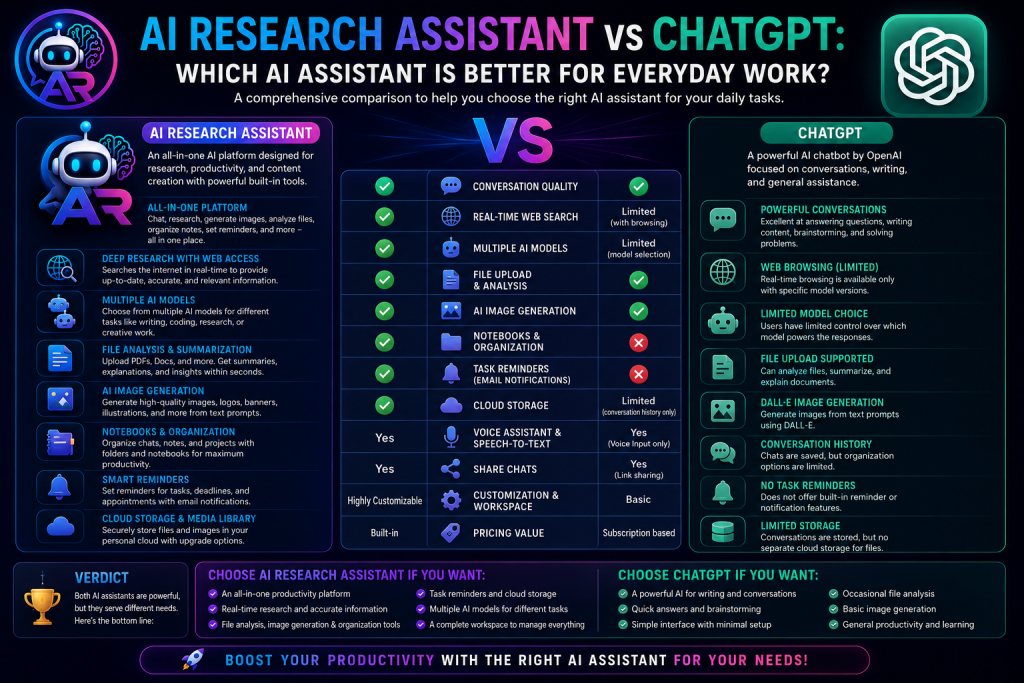
Artificial intelligence has become an essential part of modern work, education, and creativity. Among the growing number of AI platforms, AI Research Assistant and ChatGPT are two powerful solutions that help users complete tasks more efficiently.

While both platforms use AI to answer questions and assist users, they are designed with different goals in mind. This comparison will help you understand which platform is the better choice for your daily workflow.

What Is AI Research Assistant?


AI Research Assistant is an all-in-one AI productivity platform designed for research, content creation, organization, collaboration, and project management.

Instead of offering only AI conversations, it combines multiple productivity tools into a single workspace, allowing users to chat with AI, generate images, analyze files, organize notebooks, create reminders, and much more.

What Is ChatGPT?


ChatGPT is an AI assistant developed to help users with conversations, writing, coding, brainstorming, learning, and problem-solving.

It provides natural language responses and supports a wide variety of personal and professional tasks through an easy-to-use conversational interface.

AI Chat Experience


Both platforms provide intelligent AI conversations capable of answering questions, generating content, explaining concepts, writing code, and assisting with daily tasks.

AI Research Assistant extends this experience by allowing users to organize conversations into folders, create notebooks, and share chats securely with others.

Multiple AI Models


AI Research Assistant allows users to choose from multiple AI models depending on their requirements. Different models can be selected for speed, reasoning, creativity, or advanced research.

This flexibility gives users greater control over how they interact with AI.

Deep Research


One of the standout features of AI Research Assistant is Deep Research.

When enabled, the platform can search the web for the latest information before generating a response. This makes it especially useful for current events, technology updates, market research, product comparisons, and academic research.

AI Image Generation


AI Research Assistant includes built-in image generation, allowing users to create original images simply by describing what they want.

Users can generate:

  • Logos
  • Banners
  • Social media graphics
  • Illustrations
  • Marketing materials
  • Concept art

All generated images are automatically saved inside the user’s personal gallery.

File Analysis


Working with large documents becomes much easier using AI Research Assistant.

Users can upload PDFs, Word documents, reports, research papers, and text files for instant analysis, summarization, and explanation.

This feature helps save significant time when reviewing lengthy documents.

Voice Assistant


AI Research Assistant supports real-time voice conversations, allowing users to interact with AI naturally without typing.

Voice interaction is ideal for brainstorming ideas, multitasking, and hands-free productivity.

Notebook and Folder Organization


Unlike traditional AI chat interfaces, AI Research Assistant includes built-in organization tools.

Users can:

  • Create notebooks
  • Organize chats into folders
  • Store research notes
  • Manage projects
  • Separate personal and professional work

These features make long-term AI usage much easier.

Smart Task Reminders


AI Research Assistant also functions as a productivity assistant.

Users can create reminders for meetings, assignments, projects, business deadlines, and personal tasks while receiving email notifications to stay organized.

Cloud Storage


Every account includes dedicated cloud storage for uploaded documents and AI-generated images.

Users who need additional space can purchase storage add-ons without upgrading their entire subscription.

Collaboration Features


AI Research Assistant makes collaboration simple.

Users can share conversations using public links or password-protected access, making it easy to collaborate with classmates, colleagues, clients, or team members.

Which Platform Is Better?


The answer depends on your needs.

If your primary requirement is an AI chatbot for writing, coding, brainstorming, or answering questions, both platforms offer an excellent experience.

However, if you’re looking for a complete AI workspace that combines research, productivity, organization, cloud storage, voice interaction, image generation, file analysis, notebooks, and task management in one place, AI Research Assistant offers a more comprehensive solution.

Who Should Use AI Research Assistant?


AI Research Assistant is ideal for:

  • Students
  • Developers
  • Researchers
  • Writers
  • Content creators
  • Business professionals
  • Freelancers
  • Marketing teams

Its combination of AI-powered tools makes it suitable for both personal and professional use.

Final Thoughts


Artificial intelligence is no longer limited to answering questions—it has become an essential productivity tool.

AI Research Assistant goes beyond traditional AI conversations by providing an integrated workspace where users can research, create, organize, collaborate, and manage projects without switching between multiple applications.

Whether you’re studying, writing, coding, managing a business, or conducting research, AI Research Assistant is designed to simplify your workflow and help you accomplish more every day.

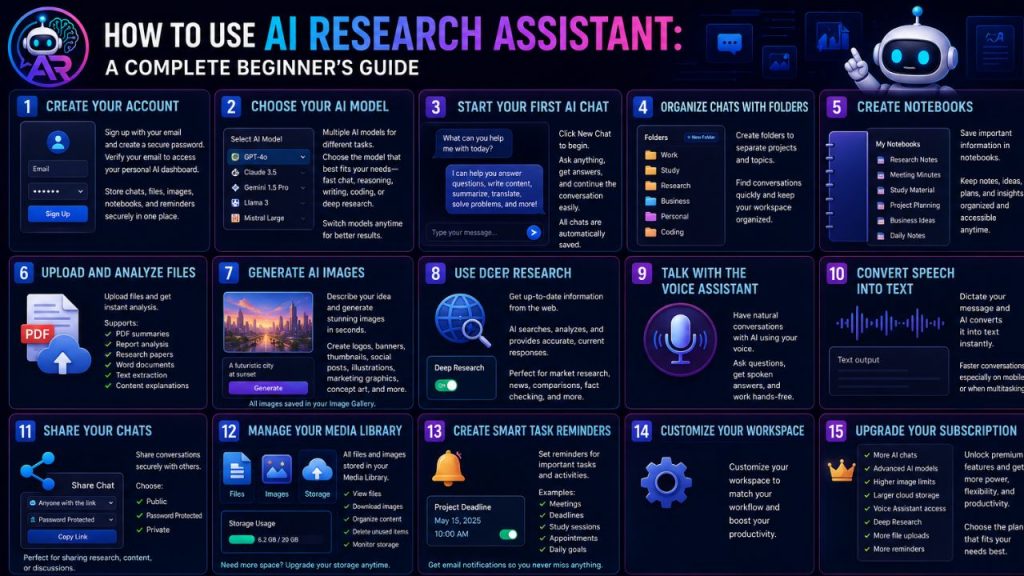
How to Use AI Research Assistant: A Complete Beginner’s Guide

July 6, 2026 admin

Getting started with AI Research Assistant is simple. Whether you want to chat with AI, perform deep research, generate images, organize projects, or manage daily tasks, the platform is designed to be easy for everyone.

This beginner’s guide will walk you through the essential features and help you make the most of your AI workspace.

Create Your Account


The first step is creating your AI Research Assistant account.

Simply sign up using your email address and create a secure password. After verifying your email, you’ll gain access to your personal AI dashboard.

Your account allows you to securely store chats, uploaded files, generated images, notebooks, and reminders in one place.

Choose Your AI Model


AI Research Assistant offers multiple AI models, each optimized for different tasks.

Depending on your subscription, you can select the model that best fits your needs, whether it’s fast conversations, advanced reasoning, creative writing, coding assistance, or deep research.

Switching between models is quick and allows you to get the best results for every task.

Start Your First AI Chat


Click New Chat to begin a conversation.

You can ask questions, write articles, generate ideas, summarize documents, translate languages, solve coding problems, or simply have a natural conversation with AI.

Every conversation is automatically saved, making it easy to continue where you left off.

Organize Chats with Folders


As your conversations grow, organization becomes important.

Create folders to separate different projects such as:

  • Work
  • Study
  • Research
  • Business
  • Personal
  • Coding

Folders help you quickly find previous conversations without searching through a long chat history.

Create Notebooks


Notebooks let you save important information separately from your chat history.

Use notebooks for:

  • Research notes
  • Meeting minutes
  • Study material
  • Project planning
  • Business ideas
  • Daily notes

Everything remains organized and accessible whenever you need it.

Upload and Analyze Files


Need help understanding a document?

Simply upload your file, and AI Research Assistant can analyze it within seconds.

Supported tasks include:

  • PDF summaries
  • Report analysis
  • Research papers
  • Word documents
  • Text extraction
  • Content explanations

This feature saves valuable time when working with lengthy documents.

Generate AI Images


Creating professional images is as easy as writing a sentence.

Describe what you want, and AI Research Assistant will generate original images based on your prompt.

You can create:

  • Logos
  • Banners
  • Thumbnails
  • Social media posts
  • Illustrations
  • Marketing graphics
  • Concept art

Every generated image is automatically saved in your Image Gallery.

Use Deep Research


When you need current information, enable Deep Research.

Instead of relying only on existing AI knowledge, the platform searches the web to gather fresh and relevant information before generating a response.

This feature is especially useful for:

  • Market research
  • Technology updates
  • Product comparisons
  • News summaries
  • Academic research
  • Fact checking

Talk with the Voice Assistant


Prefer speaking instead of typing?

The built-in Voice Assistant lets you have natural conversations with AI in real time.

Ask questions, receive spoken answers, brainstorm ideas, or work hands-free while completing other tasks.

Convert Speech into Text


Speech-to-Text allows you to dictate messages instead of typing them.

This makes conversations faster, especially on mobile devices or during busy work sessions.

Share Your Chats


Need to collaborate with someone?

AI Research Assistant allows you to share conversations using secure links.

You can choose whether the chat should be:

  • Public
  • Password Protected
  • Private

This makes it easy to share research, discussions, or AI-generated content with colleagues, classmates, or clients.

Manage Your Media Library


All uploaded files and AI-generated images are stored inside your personal Media Library.

From there, you can:

  • View files
  • Download images
  • Organize content
  • Delete unused items
  • Monitor storage usage

If you need more space, additional storage packages are available.

Create Smart Task Reminders


Stay organized by creating reminders for important activities.

Examples include:

  • Meetings
  • Project deadlines
  • Study sessions
  • Business appointments
  • Daily goals
  • Personal events

AI Research Assistant sends email notifications to help ensure you never miss an important task.

Customize Your Workspace


Make the platform work the way you prefer.

You can organize chats, manage folders, switch AI models, review previous conversations, and personalize your workflow for maximum productivity.

Upgrade Your Subscription


As your needs grow, you can upgrade to a premium subscription.

Premium plans unlock additional benefits such as:

  • More AI chats
  • Advanced AI models
  • Higher image generation limits
  • Larger cloud storage
  • Voice Assistant access
  • Deep Research
  • Increased file uploads
  • Extended task reminder limits

Choose the plan that best matches your personal or professional requirements.

Tips for New Users


To get the best experience with AI Research Assistant:

  • Use clear and specific prompts.
  • Organize chats into folders from the beginning.
  • Save important information in notebooks.
  • Use Deep Research for up-to-date information.
  • Upload documents instead of copying large amounts of text.
  • Take advantage of AI image generation for creative projects.
  • Set reminders for important deadlines.
  • Regularly organize your Media Library to keep your workspace clean.

Final Thoughts


AI Research Assistant is more than just an AI chatbot—it’s a complete productivity platform designed to help you research, create, organize, and accomplish more in less time.

Whether you’re a student preparing for exams, a developer writing code, a writer creating content, or a business professional managing projects, AI Research Assistant provides the tools you need in one powerful and easy-to-use workspace.

Start exploring its features today and discover how artificial intelligence can simplify your daily work, boost creativity, and improve productivity.

10 Powerful Features of AI Research Assistant That Will Boost Your Productivity

July 6, 2026 admin

Artificial Intelligence has changed the way people work, study, research, and create content. Instead of using multiple tools for different tasks, AI Research Assistant brings everything together in one intelligent platform.

Whether you’re a student, developer, writer, business owner, or researcher, these powerful features can help you save time and work more efficiently.

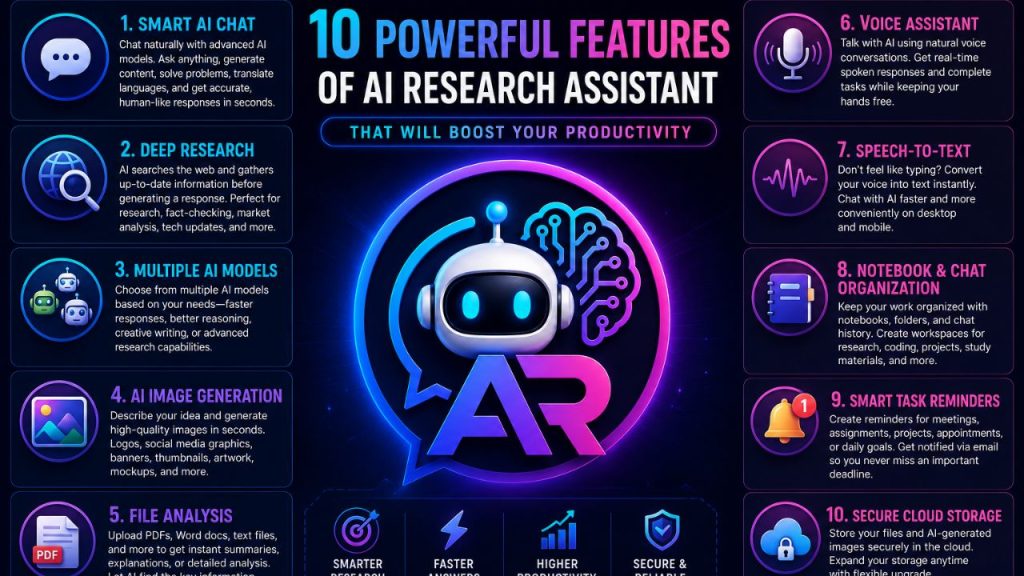
1. Smart AI Chat

AI Research Assistant allows you to chat naturally with advanced AI models. You can ask questions, write content, generate ideas, solve coding problems, summarize documents, translate languages, and much more.

The AI understands context and provides accurate, human-like responses in seconds.

2. Deep Research

Need the latest information from the internet?

Deep Research enables AI to search the web and gather up-to-date information before generating a response. This makes it ideal for research, fact-checking, market analysis, technology updates, and current events.

3. Multiple AI Models

Different tasks require different AI capabilities.

AI Research Assistant lets users choose from multiple AI models depending on whether they need faster responses, better reasoning, creative writing, or advanced research capabilities.

4. AI Image Generation

Simply describe your idea in words, and AI Research Assistant can generate high-quality images within seconds.

Create:

  • Logos
  • Social media graphics
  • Banners
  • Thumbnails
  • Digital artwork
  • Product mockups
  • Marketing visuals

without needing professional design skills.

5. File Analysis

Upload PDFs, Word documents, text files, and other supported formats to receive instant summaries, explanations, or detailed analysis.

Instead of reading lengthy documents manually, let AI identify the most important information for you.

6. Voice Assistant

Talk with AI using natural voice conversations.

The real-time Voice Assistant provides spoken responses, making it easier to brainstorm ideas, ask questions, or complete tasks while keeping your hands free.

7. Speech-to-Text

Don’t feel like typing?

Use Speech-to-Text to convert your voice into text instantly. This feature makes chatting with AI faster and more convenient on both desktop and mobile devices.

8. Notebook & Chat Organization

Keep your work organized with built-in notebooks, folders, and chat history.

Create separate workspaces for:

  • Research
  • Coding
  • Personal notes
  • Business projects
  • Study materials

This helps you quickly find previous conversations and important information.

9. Smart Task Reminders

Never miss an important deadline again.

Create reminders for meetings, assignments, projects, appointments, or daily goals. AI Research Assistant can notify you through email, helping you stay organized and productive.

10. Secure Cloud Storage

Every account includes personal cloud storage where you can safely keep uploaded files and AI-generated images.

Need more space? Additional storage packages are available, allowing you to expand your storage whenever required.

Why Choose AI Research Assistant?


Unlike traditional AI tools that focus on only one feature, AI Research Assistant combines everything into a single platform.

With AI chat, live research, image generation, voice conversations, file analysis, notebooks, task reminders, and cloud storage working together, users can complete more work without switching between different applications.

Whether you’re learning, creating, researching, or managing projects, AI Research Assistant provides the tools you need in one powerful workspace.

Final Thoughts


Productivity isn’t about working harder—it’s about working smarter.

AI Research Assistant combines intelligent AI technology with practical productivity tools, making it easier to research, create, organize, and accomplish more every day. Whether you’re a beginner or a professional, these powerful features can help you save time and unlock your full potential.

What Is AI Research Assistant? Everything You Need to Know

July 6, 2026 admin

What Is AI Research Assistant?


Artificial Intelligence is transforming the way people work, learn, and create. Whether you’re a student, developer, writer, marketer, researcher, or business owner, having the right AI assistant can save time and improve productivity.

AI Research Assistant is an all-in-one AI workspace designed to help users complete everyday tasks faster and more efficiently. Instead of switching between multiple AI tools, you can access everything from one platform.

From intelligent conversations and live web research to AI image generation, file analysis, notebooks, voice conversations, and task reminders, AI Research Assistant combines multiple powerful features into one simple experience.

Why Was AI Research Assistant Created?


Many AI platforms focus on only one feature. Some specialize in chatting, while others provide image generation or research capabilities.

AI Research Assistant was designed to solve this problem by bringing essential AI tools together in one place.

Users can manage conversations, organize projects, create notes, generate images, analyze documents, perform online research, and stay productive without leaving the platform.

Key Features


AI Chat

Chat naturally with multiple AI models to receive answers, explanations, coding help, writing assistance, brainstorming ideas, translations, summaries, and much more.

Whether you’re solving technical problems or writing content, AI Chat provides fast and intelligent responses.

Deep Research

Deep Research allows the AI to search the web for current information before answering your question.

This feature is useful for:

  • Latest news
  • Market research
  • Product comparisons
  • Technology updates
  • Academic research
  • Fact checking

Instead of relying only on existing knowledge, AI Research Assistant can gather fresh information when needed.

Multiple AI Models

Different tasks require different AI capabilities.

AI Research Assistant includes multiple AI models, allowing users to choose the one that best matches their needs for speed, creativity, reasoning, or research.

AI Image Generation

Need an illustration, logo, banner, social media post, thumbnail, or concept art?

Simply describe your idea, and AI Research Assistant can generate high-quality images within seconds.

This feature is perfect for:

  • Content creators
  • Designers
  • Businesses
  • Students
  • Social media managers
  • Developers

File Analysis

Upload documents and let AI analyze them instantly.

Supported tasks include:

  • PDF summaries
  • Document analysis
  • Research papers
  • Reports
  • Contracts
  • Text extraction
  • Data interpretation

Instead of reading hundreds of pages manually, users can quickly understand the important information.

Speech-to-Text

Users can speak instead of typing.

Speech is automatically converted into text, making conversations faster and more natural.

Voice Assistant

Interact with AI using real-time voice conversations.

Ask questions naturally and receive spoken responses for a hands-free experience.

Notebook

Create organized notebooks for ideas, research, meeting notes, study materials, and project documentation.

Everything stays organized and easy to access.

Chat Folders

Organize conversations into folders.

Examples include:

  • Work
  • School
  • Personal
  • Coding
  • Marketing
  • Research

Finding previous conversations becomes much easier.

Chat Sharing

Share AI conversations with others.

Users can:

  • Create public links
  • Password-protect chats
  • Collaborate securely

Image Gallery

Every generated image is automatically stored in a personal gallery.

Users can browse, download, and manage previously created images whenever needed.

Task Reminders

Stay organized with AI-powered reminders.

Create tasks for:

  • Meetings
  • Deadlines
  • Projects
  • Homework
  • Business activities
  • Daily goals

Email notifications help users remember important events.

Personal Media Storage

Every account includes secure cloud storage for uploaded files and generated images.

Storage depends on the selected subscription plan, with additional storage packages available for users who need more space.

Notifications

Receive important updates including:

  • Account activity
  • Task reminders
  • Shared chats
  • Storage alerts
  • Subscription updates
  • AI processing status

Who Can Use AI Research Assistant?


AI Research Assistant is designed for everyone.

Students

  • Homework assistance
  • Research
  • Essay writing
  • Exam preparation
  • Study notes

Developers

  • Programming help
  • Code explanations
  • Bug fixing
  • API guidance
  • Documentation

Writers

  • Blog writing
  • Article creation
  • Editing
  • Summarization
  • Content ideas

Businesses

  • Customer communication
  • Market research
  • Productivity
  • Team organization
  • AI-assisted workflows

Researchers

  • Information gathering
  • Document analysis
  • Online research
  • Data summarization

Content Creators

  • Image generation
  • Script writing
  • Video ideas
  • Social media captions
  • Creative brainstorming

Why Choose AI Research Assistant?


Unlike many AI tools that focus on only one capability, AI Research Assistant combines multiple productivity features into a single platform.

Benefits include:

  • Multiple AI models
  • AI chat
  • Live research
  • Image generation
  • Voice assistant
  • Speech-to-text
  • File analysis
  • Notebooks
  • Folder organization
  • Chat sharing
  • Cloud storage
  • Task reminders
  • Secure user accounts

This integrated approach helps users work more efficiently without constantly switching between different applications.

Future Improvements


AI Research Assistant continues to evolve with new features and improvements.

Upcoming enhancements may include:

  • Team collaboration
  • Shared workspaces
  • Advanced AI agents
  • Workflow automation
  • More AI models
  • Expanded storage options
  • Faster image generation
  • Additional productivity tools

Final Thoughts


AI is becoming an essential part of modern work and learning. AI Research Assistant brings together powerful tools for chatting, researching, creating, organizing, and collaborating in one platform.

Whether you’re writing content, analyzing documents, generating images, conducting research, or managing daily tasks, AI Research Assistant is built to help you work smarter and save valuable time.

If you’re looking for an all-in-one AI workspace that combines intelligence, productivity, and creativity, AI Research Assistant provides everything you need in one place.